Pages

Showing posts with label digital painting. Show all posts

Monday, 22 April 2013

Drawing Cartoon Characters

I recently treated myself to a Wacom Bamboo Tablet with this weird notion that I'd be able to turn my hand to digital painting. Sadly my artistic style doesn't seem to lend itself well to what I want to be able to do, so I ended up just doodling my usual type of character, and I thought I'd go through my process to show how I got from start to finish.

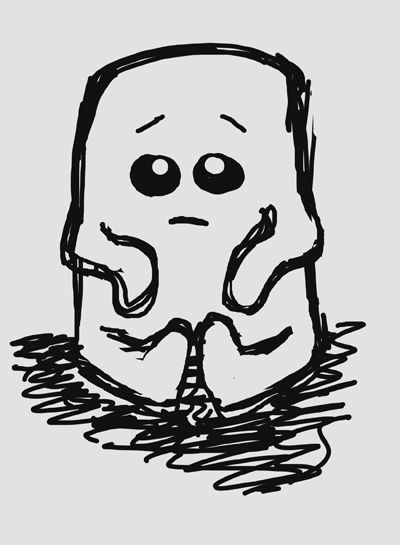
I flood filled the background with pale grey, and on a new layer, sketched this out loosely with a small, hard-edged round brush using black.


Now I created a new layer between the background and the black lines, and used a larger brush to colour the character in mid blue.


With that done, I created a new layer between the blue layer and the lines, and painted in shadows with a darker shade of blue and a soft-edged brush on a low opacity.


I repeated the last step, albeit this time using a lighter shade of blue to give highlights. Et voila!


What about you? Have you ever used a graphics tablet, and if so, did you find it difficult to get used to?

Wednesday, 10 October 2012

Changing the Weather

Following on from the digital rain tutorial that I posted last week, I thought I'd share a short process for how I drastically altered a stock image.

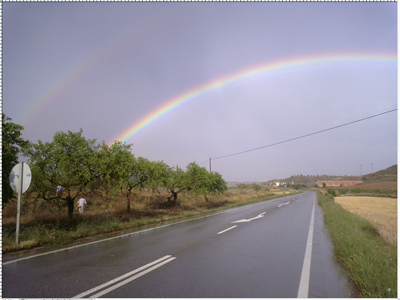
I started off with an image of a road and a rainbow from Sxc.hu.


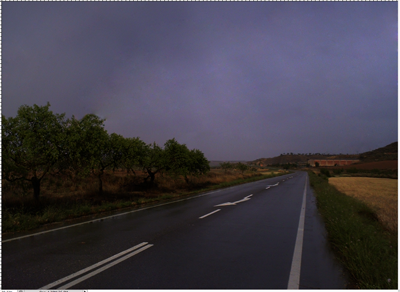
Then I removed the rainbow, cloned out the people on the left hand side, cropped the image to remove the sign to the left, and darkened the whole image using both Levels and the Brightness/Contrast function as adjustment layers.


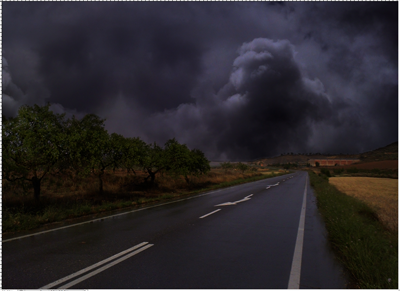
Next I added storm clouds from another stock image, this time on a new layer set to 'Multiply'.


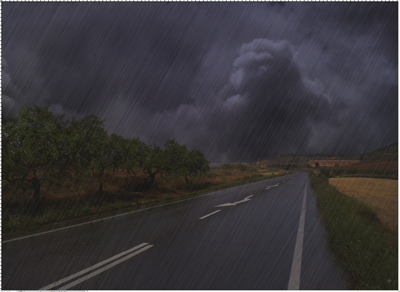
Then I added my first layer of digital rain.


And another, this time set to 'Multiply.


And finally, a dark vignette around the edges!


Sunday, 12 August 2012

Paintings 01

I decided a couple of weeks ago that I wanted to take up some form of painting again. It's been years since I did any proper painting, not since my art A Level, in fact, aside from some low level digital painting. I knew I wanted to try to master digital painting, but I also wanted to try a more traditional form. I was torn between oils and watercolours - I'd done oils at school but knew they were both messy and expensive, while watercolours were far more readily available. So far, I've just really been practicing with washes, colour mixing, and different techniques, but I did want to try and paint something recognisable, instead of just page after page of meaningless colour. This was one of my first attempts.


It was really rather simple. I began with a graded blue wash, simply adding more water to dilute the colour, to make the sky lighter as it approached the horizon, and then dried my brush in order to apply the blue paint for the water using the dry brush technique. The resulting white patches among the lines resemble light on water.

Once the sky and water were dry, I then used a much finer brush to sketch in the boat using dark brown. When it was dry, I added another layer to give a shadow and sense of depth to the hull and mast. Again I used the dry brush technique to add a reflection in the water.

All in all, I'm pretty pleased with it - it's not exactly going to blow the minds of the art world but it's simple and recognisable!

As for my attempts at digital painting, I loaded up Photoshop CS5, plugged in a Wacom Bamboo, and had a go.


I started off by actually tracing the tree outline from a photograph, and just added shadow by going over the areas several times. Then I created several background layers, altered different brush settings in the Wet Media brush set, and created a graded sky by sampling colours from a photograph of a sunset. I was quite pleased with the stipling on the grass, and the blending of the sky, although the white cloud effect doesn't work. All in all, I think I may give digital painting another go!

Sunday, 29 July 2012

How It's Done - 01

I've been considering getting back into painting, both digital and traditional, and I've been talking to artists online about what tools, software and techniques they use. During the discussion, someone sent me this link, and I thought I'd share it as a good example of how you can combine the digital with the traditional. The work in question is by John Picacio, and illustrates Bran Stark of the Game of Thrones series atop his home of Winterfell. The full piece is here, but it's interesting to see how Picacio got from this;


to this;


It's always fascinating finding out how other artists work, and it's nice to see an artist admitting the use of photographic references!

Do you use references, and do you prefer to work digitally or traditionally?